
Shopper buys a unit
Buying a unit is a reservation flow: the shopper picks a unit, pays a reservation fee (card) or
records a non-card reservation, submits their info, signs the reservation form, and the sale is
finished. The authoritative sale lives in the CRM (via crms-middleware); the portal keeps a
local unit_sale mirror row whose status tracks progress. Verified against current backend +
orascom-shopper-app code.
What the shopper sees
Section titled “What the shopper sees”The shopper browses Available Units — the local published mirror of CRM inventory (filter by country, destination, bedrooms), each card showing the real price/area/beds:
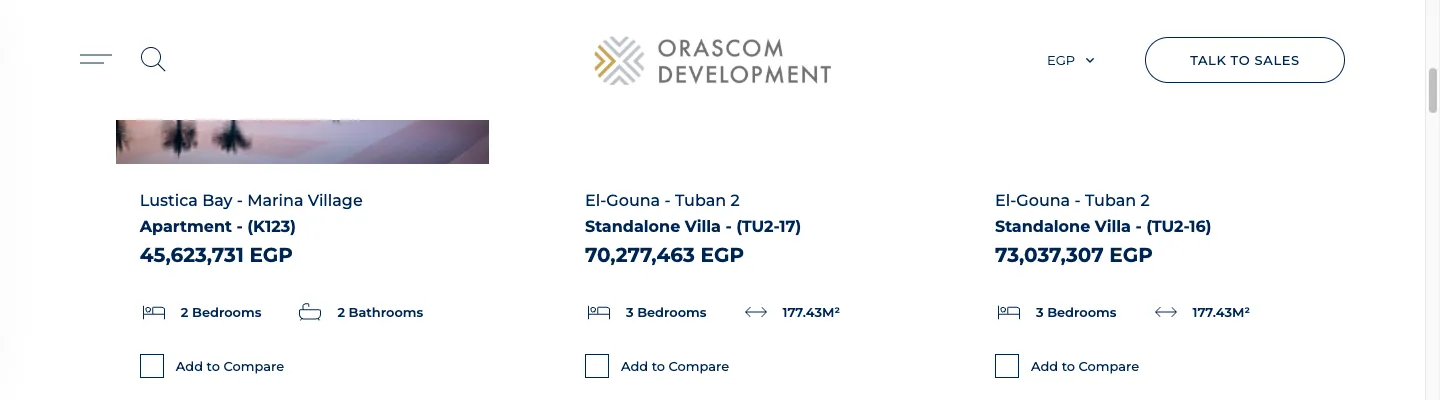
Opening a unit shows its detail (areas, gallery, payment plan) and — at the bottom — the actions that kick off the flows in these docs: Reserve unit (this flow), Download Sales Offer (the PDF flow), and I’m interested:
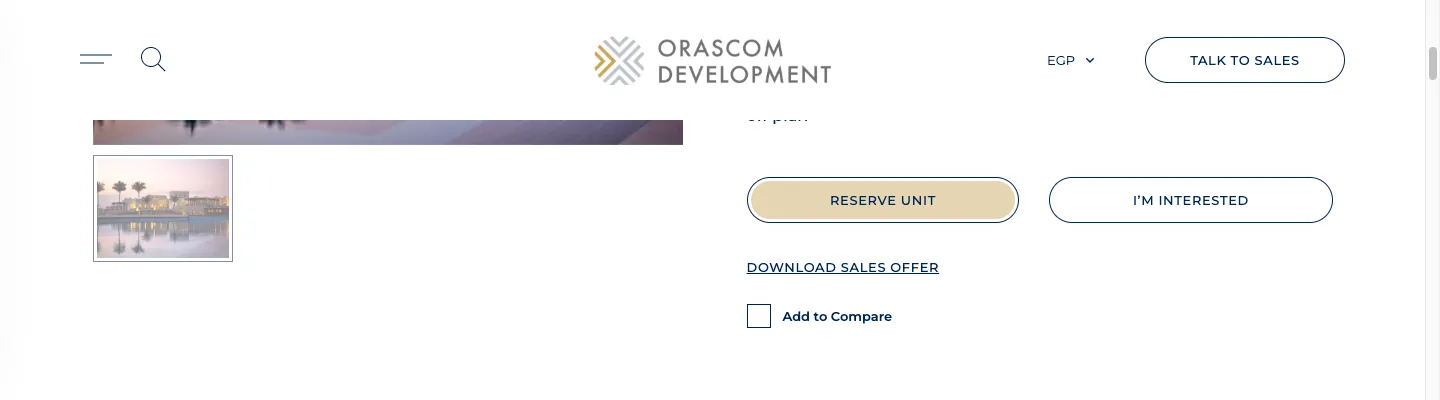
Clicking Reserve unit is what creates the unit_sale row and starts the state machine below.
The state machine
Section titled “The state machine”Everything hangs off UnitSaleStatus (app/Enums/UnitSaleStatus.php), stored on unit_sale.status:
stateDiagram-v2
[*] --> DRAFT: create sale (blocks the unit at the CRM)
DRAFT --> PENDING_INFO: reserve (non-card)
DRAFT --> PENDING_INFO: pay by card → gateway callback
PENDING_INFO --> DOWNLOAD_FORM: submit buyer info
DOWNLOAD_FORM --> PENDING_FINISH: generate reservation form
PENDING_FINISH --> DONE: finish sale
DRAFT --> CANCELED: CRM webhook (block expired / canceled)
PENDING_INFO --> CANCELED: CRM webhook
note right of CANCELED
  CRM-owned only — the shopper
  app never sets CANCELED
end note
Step by step
Section titled “Step by step”-
Browse & open a unit —
GET /api/shopper/unitsthenGET /api/shopper/units/{unit}(public). Both read the local published mirror (no CRM call). -
View payment terms —
GET /api/shopper/units/{unit}/payment-terms→ a live CRM read of the real per-country payment plans. -
Create the sale (blocks the unit) —
POST /api/shopper/units/{unit}/sale(UnitSaleController@createUnitSale).CreateSaleCrmposts to the CRM withunit_block_duration, which blocks the unit at the CRM; on successCreateSalePortalwrites the localunit_salerow at status DRAFT (storingsale_source_id,customer_source_id,paymentplan_source_id). -
Reserve — non-card OR card:
- Non-card —
POST .../{sale}/reserve(ReserveSaleCrm, sendsupdate_info_duration) → on CRM 200, status PENDING_INFO. - Card —
POST .../{sale}/paymentreturns a gateway session (Paymob/Thawani/WSPG by the unit’s country). The SPA redirects to the gateway; the CRM reserve happens server-side in the callback (next section). The{salePayment}binding is DRAFT-only — retryingpaymentafter the sale advanced returns 404.
- Non-card —
-
Submit buyer info —
POST .../{sale}/update-info(UpdateInfoCrm) → status DOWNLOAD_FORM. -
Generate the reservation form —
POST .../{sale}/reservation-form→ status PENDING_FINISH; streams the PDF back. -
Upload the signed form —
POST .../{sale}/attach(multipart to the CRM). No local status change — the advance to PENDING_FINISH was owned by step 6. -
Finish the sale —
PATCH .../{sale}/finish-sale(UpdateSalePortal) → status DONE +closed_at_dm; notifies the shopper. Installments are then readable live viaGET /api/shopper/sales/{saleSourceId}/installments.
The card-payment path (where it re-enters)
Section titled “The card-payment path (where it re-enters)”sequenceDiagram
participant SPA as Shopper SPA
participant API as Backend
participant GW as Gateway (Paymob/Thawani/WSPG)
SPA->>API: POST /api/shopper/units/{unit}/{sale}/payment
API->>GW: create order/session (by unit country)
API-->>SPA: payment key/session
SPA->>GW: redirect to gateway iframe, pay
GW-->>API: success callback (POST/GET /{gw}/callback)
Note over API: mark Transaction SUCCESS →<br/>reserveUnitCrm() → status PENDING_INFO
API-->>SPA: redirect /reserve-unit/{unit}?reserve-unit=trueGateway by the unit’s country (PaymentSale): Egypt → Paymob · Oman → Thawani · Montenegro →
WSPG. The callback (PaymentService::handleSuccessTransactionCallback) marks the transaction
SUCCESS, stamps reservation_amount + payment_method=CREDIT_DEBIT_CARD, then calls the same
ReserveSaleCrm the non-card path uses, landing on PENDING_INFO, and redirects to
/reserve-unit/{unit}?reserve-unit=true (or false if the CRM reserve failed after a successful
charge — a manual-reconcile case). The full payment mechanics — the three gateways, the callback
model, the transactions ledger, and reconciliation — are on the
online payment pipeline page.
The unit-block TTL is the CRM’s, not ours
Section titled “The unit-block TTL is the CRM’s, not ours”The portal forwards UNIT_BLOCK_DURATION on create and UPDATE_INFO_DURATION on reserve — and does
nothing else with them. There is no local expiry job. The CRM holds the block and, when it
expires or is cancelled, syncs the sale back (DRAFT/CANCELED) via the
PATCH /api/crms-middleware/sales/{id} webhook (UpdateSale). So “the unit is no longer available
mid-flow” means the CRM released the block — there’s no local timer to inspect.
What’s stored locally vs CRM-owned
Section titled “What’s stored locally vs CRM-owned”Local unit_sale row (a projection) |
CRM-owned (source of truth) |
|---|---|
status, crm_status, sale_source_id, customer_source_id, reservation_amount, payment_method, Transactions |
the sale entity, the customer, payment plan, the unit block/expiry, the reservation-form PDF, installments, the canonical status |
The CRM can override the local status back via the webhook — the only path that produces
CANCELED and the authoritative DONE/DRAFT reconciliation.
Support: a sale is stuck
Section titled “Support: a sale is stuck”Read the local row and compare status vs crm_status:
| Symptom | Cause | Where to look |
|---|---|---|
status=draft but shopper “paid” |
Card callback didn’t complete the CRM reserve | The sale’s Transactions + the handleSuccessTransactionCallback / reserveUnitCrm logs; if ?reserve-unit=false on landing, the CRM reserve failed after a successful charge → reconcile against the CRM |
pending_info not advancing |
update-info CRM call failing (only advances on CRM 200) |
The logged mappedResponse on updateInfo |
download_form not advancing |
reservation-form CRM call not returning 200 |
Its error = json_decode(response.body).message |
canceled unexpectedly |
CRM pushed a cancel via the sales/{id} webhook |
UpdateSale per-country cancel-code mapping — CRM-driven, not a portal bug |
Common failure points: CRM auth token (CrmMiddlewareClient), a wrong destination→country slug
(routes to the wrong CRM), missing payment-gateway config keys (PaymentSale returns null →
“failed to get payment key”), and — for currency-choice destinations — a missing currency on the
sale (→ 400).